Free Confusion Matrix Calculator
Enter your model's results to instantly calculate accuracy, precision, and many other performance metrics.
Class Labels
Optional. Renames the matrix axes only (e.g. Dog / Cat). All metrics keep their standard names; the positive class is the one that drives Sensitivity, Precision, and the rest.
Quick Presets
Predictions & Threshold
Class Setup
Optional. Comma-separated names rename the matrix rows and columns. Anything missing falls back to Class 1, Class 2…
Confusion Matrix
Core Metrics
Composite Scores
Errors & Effectiveness
Ratios & Complements
Multi-class Metrics
| Class | Precision | Recall | F1 | Support |
|---|
Understanding the Confusion Matrix
What Is a Confusion Matrix?
A confusion matrix is a table that checks a classification model's predictions against the truth, so you can see exactly what kind of mistakes it's making instead of collapsing everything into one accuracy number. For a binary (two-class) problem it's a 2×2 grid. Every prediction lands in exactly one of four cells: true positive, true negative, false positive, or false negative. Every metric on this page, from accuracy to the diagnostic odds ratio, is arithmetic on those four counts.
How to Read TP, TN, FP, and FN
In this tool's matrix, rows are the actual class and columns are the model's predicted class, the same convention scikit-learn's confusion_matrix and R's caret::confusionMatrix use. That gives four outcomes:
- True Positive (TP): predicted positive, actually positive. A correct catch.
- True Negative (TN): predicted negative, actually negative. A correct pass.
- False Positive (FP): predicted positive, actually negative. A false alarm (Type I error).
- False Negative (FN): predicted negative, actually positive. A miss (Type II error).
Full definitions are in the metric glossary below, along with which trade-off matters most for your use case.
How to Use This Tool
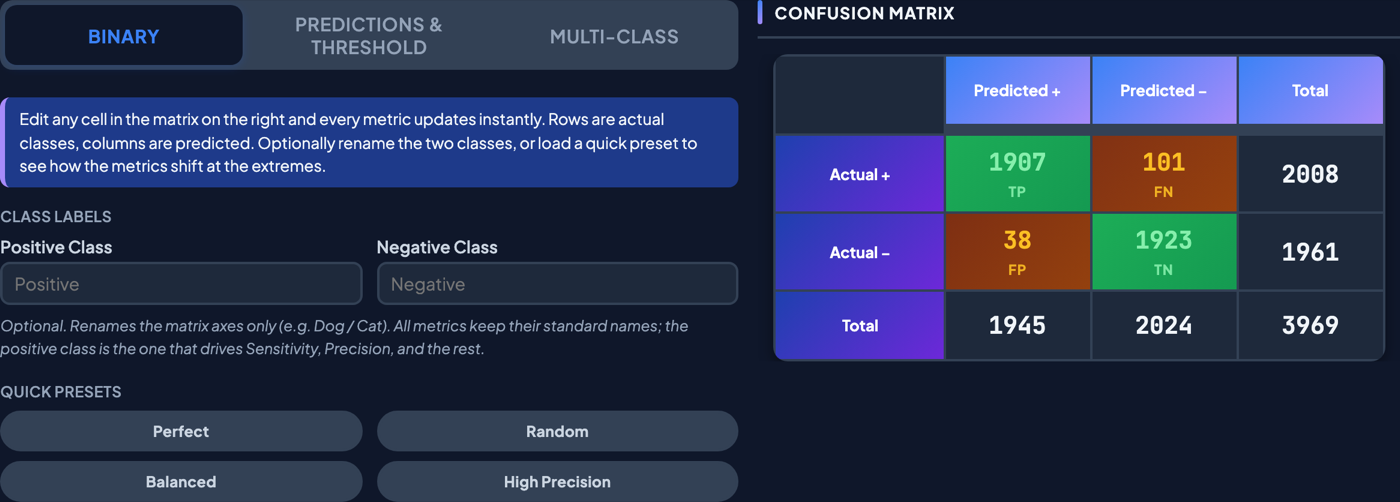
Three ways to get your data in, depending on what you already have:
- Binary: type TP, TN, FP, FN directly if your model is already scored.
- Predictions & Threshold: paste predicted probabilities and true labels, or upload a CSV. The matrix builds itself at a decision threshold you drag live, with ROC and Precision-Recall curves updating alongside it.
- Multi-Class: for 3 to 10 classes, enter the full N×N matrix and get per-class precision, recall, F1, macro/weighted averages, and multi-class Cohen's κ.
Every metric shows a value, a 95% confidence interval, and its formula. Hover any for a one-line recap. Everything runs locally in your browser, and nothing you enter is uploaded anywhere (see the privacy notes). The full site guide covers baseline comparison, class labels, export, and embedding in more depth.
Confusion Matrix Formulas: A Worked Example
Say a spam filter is tested against 1,000 real emails, 200 of which are actually spam. It correctly flags 180 of those 200 (catching most of the spam) and correctly lets through 760 of the 800 real emails, at the cost of wrongly flagging 40 good emails and letting 20 spam messages slip by:
| Predicted spam | Predicted not spam | |
|---|---|---|
| Actually spam | TP = 180 | FN = 20 |
| Actually not spam | FP = 40 | TN = 760 |
Every formula below is just those four counts, rearranged:
| Metric | Formula | Calculation | Result |
|---|---|---|---|
| Accuracy | (TP+TN) / Total | (180+760) / 1000 | 94% |
| Sensitivity (Recall) | TP / (TP+FN) | 180 / 200 | 90% |
| Specificity | TN / (TN+FP) | 760 / 800 | 95% |
| Precision | TP / (TP+FP) | 180 / 220 | 81.82% |
| F1-Score | 2·P·R / (P+R) | 2(.8182)(.90) / (.8182+.90) | 85.71% |
| False Positive Rate | FP / (TN+FP) | 40 / 800 | 5% |
| False Negative Rate | FN / (TP+FN) | 20 / 200 | 10% |
| Balanced Accuracy | (Sens+Spec) / 2 | (90%+95%) / 2 | 92.5% |
| MCC | (TP·TN−FP·FN) / √(…) | 136,000 / 165,699 | 0.82 |
Accuracy (94%) looks strong on its own, but it doesn't show that the filter still misses 1 in 10 real spam messages (FNR = 10%). That's the whole case for a confusion matrix over a single number. Try your own counts in the Binary tab above, check every metric's full definition and CI method in the glossary below, or jump to the complete formula reference for all 22 at once.
Frequently Asked Questions
What is a confusion matrix used for?
Evaluating any classifier that sorts things into categories: spam filters, medical screening tests, fraud detection, image classifiers. It breaks accuracy apart into the specific ways a model gets things wrong. False positives and false negatives are rarely equally costly, and a single accuracy number can't tell them apart.
How do you calculate accuracy from a confusion matrix?
Accuracy is (TP + TN) divided by the total number of predictions: the share of all predictions the model got right. In the worked example above, (180 + 760) / 1,000 = 94%. It's the simplest metric, but it can be misleading on imbalanced data. A filter that marked every email "not spam" would still score 80% accuracy on this same dataset while catching zero spam.
What's the difference between precision and recall?
Recall (sensitivity) asks "of everything that was actually positive, how much did the model catch?" That's TP / (TP + FN). Precision asks "of everything the model flagged positive, how much was actually right?" That's TP / (TP + FP). A model can score high on one and low on the other. F1-Score balances both into a single number.
What is a good F1 score?
There's no universal cutoff. It depends on class balance and how costly each error type is for your specific problem. On a balanced, well-posed task, 0.8+ is generally considered strong and 0.9+ excellent, but the better approach is comparing against a baseline (like the Random or Perfect presets on the Binary tab) instead of a fixed number pulled from nowhere. The F1 score calculator covers this in more depth, including the F0.5 and F2 variants for when precision and recall matter unequally.
What's the difference between sensitivity and specificity?
Sensitivity measures how well the model catches actual positives: TP / (TP + FN). Specificity measures how well it clears actual negatives: TN / (TN + FP). A medical test can have high sensitivity (it rarely misses the disease) but low specificity (it also flags a lot of healthy patients). The two numbers describe different failure modes, and neither alone tells the full story.
Can this calculator handle more than two classes?
Yes. The Multi-Class tab supports 3 to 10 classes. Enter or paste the full N×N matrix and it returns per-class precision, recall, and F1, plus macro-average, weighted-average, and multi-class Cohen's kappa.
Is my data uploaded or stored anywhere?
No. Every calculation, including CSV uploads, runs locally in your browser. Nothing is sent to a server or stored anywhere, and closing the tab discards it. Full detail is in the Disclaimer tab below.
Metric Definitions & Terminology
Core Metrics
Accuracy
Share of all predictions that were correct, positives and negatives combined.
Honest when the classes are roughly balanced. When one dominates it flatters lazy models: with 95% negatives, always answering "negative" scores 95%.
Best for a first read on balanced data, before an imbalance-aware metric.
Formula: (TP + TN) / (TP + TN + FP + FN)
Sensitivity · Recall · TPR · Power (1 − β)
Share of actual positives the model caught.
The model's thoroughness, called recall in ML, TPR in ROC analysis and power (1 − β) in statistics. It ignores false alarms, so pair it with specificity or precision.
Best for catching every positive when a miss is the costly error. Medical screening Fraud detection
Formula: TP / (TP + FN)
Specificity · TNR
Share of actual negatives the model correctly left alone.
The mirror of sensitivity, also called the true negative rate. High specificity means few false alarms.
Best for avoiding false alarms, such as confirmatory tests or spam filters that must not bin real mail. Clinical diagnostics
Formula: TN / (TN + FP)
Precision · PPV
Share of positive predictions that were correct.
Answers "when it says positive, can I believe it?" Called PPV in medicine. It falls as positives get rarer, however good the model.
Best for cases where acting on a positive is expensive. Search & recommendation Fraud review
Formula: TP / (TP + FP)
Negative Predictive Value (NPV)
Share of negative predictions that were correct.
Tells you whether an "all clear" can be trusted. It rises as the condition gets rarer.
Best for rule-out tests, where a negative result sends someone home. Clinical diagnostics
Formula: TN / (TN + FN)
Prevalence
How common the positive class is in the data.
A property of the data, not the model, but it decides whether accuracy can be trusted and how high precision can go.
Best for context: check it before reading any other metric. Epidemiology
Formula: (TP + FN) / (TP + TN + FP + FN)
Advanced Metrics
F1-Score
Harmonic mean of precision and recall.
Stays high only when both are high, so a strong precision can't hide a weak recall. Ignores true negatives.
Best for one number to optimise when both errors matter and positives are rare. NLP Information retrieval
Formula: 2 × (Precision × Recall) / (Precision + Recall)
FPR · Type I Error (α)
Share of actual negatives wrongly flagged positive.
The false-alarm rate, or Type I error (α). It is the x-axis of every ROC curve, and lower is better.
Best for setting a false-alarm budget. Hypothesis testing Security alerting
Formula: FP / (TN + FP)
FNR · Type II Error (β)
Share of actual positives the model missed.
The miss rate, or Type II error (β). Equal to 1 − sensitivity.
Best for tracking misses when a miss is dangerous. Medical screening Safety systems
Formula: FN / (TP + FN)
Balanced Accuracy
Average of sensitivity and specificity.
Scores each class separately and weights them equally, so a dominant class can't inflate it.
Best for an honest overall score on imbalanced data.
Formula: (Sensitivity + Specificity) / 2
Matthews Correlation Coefficient (MCC)
Correlation between predictions and truth, from −1 to +1.
+1 is perfect, 0 is a coin flip, −1 is perfectly wrong. It only scores well when all four cells are good.
Best for the single most reliable score on imbalanced data. Bioinformatics
Formula: (TP×TN − FP×FN) / √[(TP+FP)(TP+FN)(TN+FP)(TN+FN)]
Cohen's Kappa
Agreement with the truth beyond what chance would produce.
0 means no better than chance, 1 means perfect. It discounts agreement that class imbalance inflates.
Best for comparing models or annotators against human labels. Medical imaging Annotation QA
Formula: (Observed − Expected agreement) / (1 − Expected agreement)
Youden's J Statistic
Sensitivity plus specificity, minus one.
0 means the test is useless, 1 means it is flawless.
Best for picking a cut-off: the threshold that maximises J. Clinical diagnostics
Formula: Sensitivity + Specificity − 1
Markedness
Precision plus NPV, minus one.
Youden's J seen from the prediction side: how trustworthy positive and negative calls are together.
Best for checking that both kinds of result are worth acting on.
Formula: PPV + NPV − 1
Jaccard Index · IoU · Threat Score
Overlap of predicted and actual positives, ignoring true negatives.
Intersection over union. Always a little below F1, and it never flatters a rare-event model.
Best for tasks where negatives are overwhelming background. Image segmentation Object detection Weather forecasting
Formula: TP / (TP + FP + FN)
Fowlkes–Mallows Index
Geometric mean of precision and recall.
Like F1, but softer on a lopsided pair. If it drifts from F1, one of the two is carrying the score.
Best for a second opinion next to F1. Clustering evaluation
Formula: √(Precision × Recall)
Rate Complements
Error Rate (Misclassification Rate)
Share of predictions that were wrong.
Exactly 1 − accuracy, with the same blind spot on imbalanced data.
Best for reporting mistakes instead of successes.
Formula: (FP + FN) / (TP + TN + FP + FN) = 1 − Accuracy
False Discovery Rate (FDR)
Share of positive predictions that were false alarms.
1 − precision. The standard way to bound noise when making many positive calls at once.
Best for controlling false discoveries across thousands of tests. Genomics
Formula: FP / (TP + FP) = 1 − Precision
False Omission Rate (FOR)
Share of negative predictions that were actually positive.
1 − NPV. A high value means the "all clear" is hiding real cases.
Best for auditing what a rule-out step lets slip through. Screening triage
Formula: FN / (TN + FN) = 1 − NPV
Diagnostic Ratios
Positive Likelihood Ratio (LR+)
How much a positive result raises the odds of a true case.
Sensitivity ÷ FPR. 1 is useless; higher is stronger evidence. Unlike precision, it doesn't shift with prevalence.
Best for turning a pre-test probability into a post-test one. Evidence-based medicine
Formula: TPR / FPR = Sensitivity / (1 − Specificity)
Negative Likelihood Ratio (LR−)
How much a negative result lowers the odds of a true case.
Miss rate ÷ specificity. Closer to 0 is better; 1 tells you nothing.
Best for deciding whether a negative result rules a condition out. Evidence-based medicine
Formula: FNR / TNR = (1 − Sensitivity) / Specificity
Diagnostic Odds Ratio (DOR)
Overall discriminative power in one number.
LR+ ÷ LR−. 1 means the test can't separate the classes; the larger, the cleaner the separation.
Best for comparing tests across studies. Diagnostic meta-analysis
Formula: LR+ / LR− = (TP × TN) / (FP × FN)
Confusion Matrix Components
True Positive (TP)
Predicted positive, actually positive: a correct hit.
Example Spam sent to the spam folder.
True Negative (TN)
Predicted negative, actually negative: a correct pass.
Example A real email left in the inbox.
False Positive (FP)
Predicted positive, actually negative: a false alarm, or Type I error.
Example A real email sent to spam.
False Negative (FN)
Predicted negative, actually positive: a miss, or Type II error.
Example Spam that reaches the inbox.
Confusion Matrices in Python & R
Python (scikit-learn)
The functions behind this tool's Copy Python / R export, in the official scikit-learn reference.
- confusion_matrixBuilds the matrix from
y_trueandy_pred. - classification_reportPer-class precision, recall, and F1.
- ConfusionMatrixDisplayPlots the matrix as a heatmap.
- Metrics & scoringThe full model-evaluation user guide.
R (caret, yardstick, pROC)
The R equivalents the export emits, plus the tidymodels option for a modern workflow.
- caret::confusionMatrixMatrix plus roughly 20 metrics with confidence intervals.
- yardstick::conf_matThe tidymodels confusion matrix.
- pROCROC curves and AUC with confidence bands.
Confusion Matrix Pro is a free, browser-based tool for evaluating binary classification models. Enter your true positives, true negatives, false positives, and false negatives, or paste raw predicted probabilities and labels, to instantly calculate performance metrics, including accuracy, precision, recall, sensitivity, specificity, F1-score, Matthews correlation coefficient (MCC), and Cohen's kappa, alongside an interactive confusion matrix, ROC and precision-recall curves, and a live decision-threshold slider. It is designed for data scientists, machine learning engineers, students, and researchers who want a fast, no-install way to interpret model results, tune classification thresholds, and compare diagnostic performance across medical screening, fraud detection, spam filtering, and other binary classification problems.
Disclaimer
Terms of use
This tool is free for anyone to use, with no sign-up or download required. All results are provided for informational and educational purposes only. Isik & Co. makes no warranty regarding the accuracy of any calculations and accepts no liability for decisions or outcomes arising from use of this tool.
Privacy & security
Every calculation runs locally in your browser. Counts, predictions, labels, and CSV uploads are never transmitted to any server, never written to a database, and never retained beyond the current page session; closing the tab discards them. There are no user accounts, no tracking cookies, and no third-party analytics on the contents you enter. The only data this site sends anywhere is standard page-traffic telemetry from our hosting platform's analytics (page views, referrer, browser type, and approximate region from IP), none of which inspects your form fields or uploaded files. CDN-hosted libraries used for PNG and PDF export (html2canvas, jsPDF) are pinned with integrity hashes so a tampered copy cannot load. If you click Share link or Copy embed code, the values you entered are encoded into the resulting URL; that URL is yours to share or not, and only the people you give it to will see what is inside.
If this tool or its metric definitions helped your work, you're welcome to cite it. The code is MIT-licensed; the tool itself can be cited as below.
Isik & Co. (2026). Confusion Matrix Pro [Web tool]. https://confusionmatrixpro.com/
@misc{confusionmatrixpro,
  author = {{Isik and Co.}},
  title  = {Confusion Matrix Pro},
  year   = {2026},
  note   = {Web tool},
  url    = {https://confusionmatrixpro.com/}
}
Spotted a bug, a wrong number, or have an idea to make this better? We read every note. Your message opens in your own email app, ready to send, nothing is stored here.